
If you’ve been sending email promotions for your business and noticing that fewer people are opening them, you’re not alone. This is something we’ve been hearing from many businesses recently. The reason you are seeing fewer opens, especially since the beginning of the year is due to a specific change Gmail made recently that could explain the drop you are getting. It’s something most marketers haven’t noticed yet.
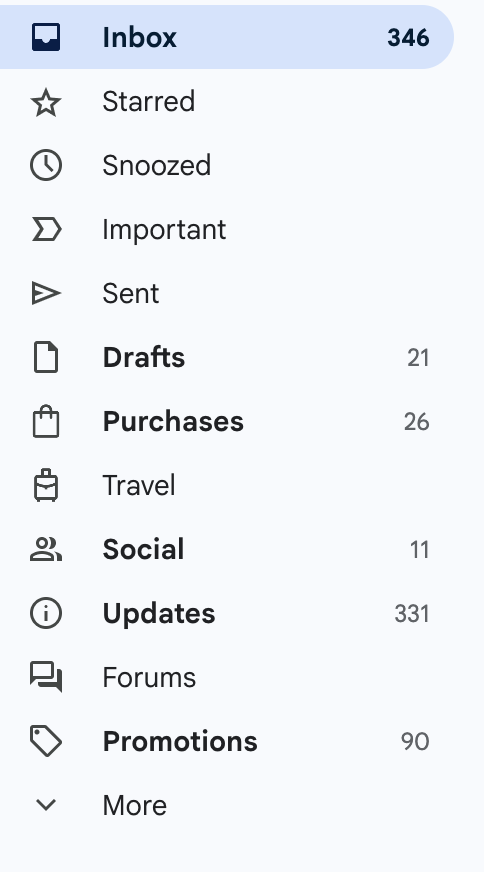
If you use Gmail yourself, Look at the tabs. You’ll see your Inbox at the top. But then you’ll see other mail boxes such as Drafts, Purchases, Social, Updates and Promotions. Over the past year or so, Gmail has gotten much more aggressive about what goes into Inboxes. Most marketing emails now go straight into Promotions. if you check your own Promotions tab, you’ll likely see tons of emails from companies trying to sell things.
The problem is most people never look at their Promotions tab. That’s the main reason open rates have dropped. It’s not that your emails suddenly became less effective. It’s that they’re not being seen in the in boxes but instead going to the Promotions box.
A lot of business owners ask if there’s a way to get back into the Primary inbox. The honest answer is that it’s difficult, especially for promotional emails. Gmail looks at things like how the email is designed, how many links it has, and how people interact with your messages. If it looks like a marketing email, it will usually end up in Promotions.
What I suggest here are things you can do help your emails get opened more and maybe help some of them go to the Inbox instread of straight to the Promotions Box. But most will still probably go to the Promotion box. So here are some thing you can do to help
Here Are Some Things You Can Do
If your email has a reply too address like this – mybusiness@112096966.mailchimpapp.com, Gmail clearly recognizes this as a marketing email sent through Mailchimp. This shows Mailchimp as the sending domain. But Mailchimp allows you to to authenticate your own domain so Gmail sees something like: news.mybusiness.com istead. This change can improve trust and sometimes improve inbox placement. However, to do this you would need to know how to add DNS numbers to your server account. But if you can’t do this there are still other things you can do to help get one of your promotional emails either into inboxes or stand out in the Promotions Box.
Other things that may help are
- Clear out inactive subscribers – If people consistently engage, Gmail may move you higher in Promotions and occasionally even into Primary for that user.
- Improve your subject line – If and when your email goes into the Promotions Box you subject line is what separates your email from all the other promotional emails. So try to make your subject stand out. If everyone is saying Sofa Sale maybe say “just arrived, 3 sofa’s everyone is talking about.
- Be consistent with the day and time you send – Gmail likes when you send the same time each week or each month.
The bottom line is you are not going to fool Google. But you can give them a reason to put your Email in the inbox occasionally if you do any of the above suggestions. If you only did one thing, probably the best thing you can do is clear out inactiive subscribers.
Recent Comments